The other day a colleague showed me a tweet about how tweets 👏 like 👏 these 👏 were👏 so👏 hard 👏 . I later thought it would make a great Chrome extension. I had a real urge to ship something, so later that week I coded it up live over on my Twitch Channel and thus, Preach! was born.
We know as good software engineers that learning, and continuously upskilling is important to our careers. In fact, it’s important to any career. But what the hell do we focus on? There’s a seemingly infinite amount of directions and paths to explore and content to learn.
Here are some things I learned along the way, that seemed non-obvious to a reasonably novice JavaScript developer. Enjoy.
You can debug extensions
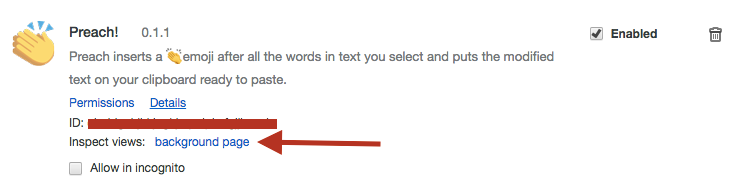
It’s actually possible to debug extensions by using the “background page”. To do this, use the same Extensions page as you are for loading your extension, and simply click background page.
Once that’s open, you have the full Chrome inspector to find that semicolon you definitely didn’t forget.
Only content scripts can modify the DOM
This totally makes sense, and it’s reasonably easy to do this. Simply add the permissions to your extension manifest. This will define what pages these run on, what file to embed in the page and when to run the JS associated
Use JS message passing to pass the message from one to another
So how do I make DOM changes from my background.js or popout.js to the page DOM? Use JavaScript Messaging. This technique lets you publish messages in contexts and have them received in other context. For my extension, I wanted to receive the modified text the extension generates and display an alert on the screen (modifying the DOM).
Nope. Joining the Google developer programme is $5 USD. Not surprising really, and a lot cheaper than say, the Apple developer Programme. I suspect the $5 fee helps remove spam and low quality extensions. Didn’t stop me though 😏😅.
Chrome Extension listing is easy
Seriously, the whole listing process for an extension is super easy. Excluding making the Chrome Web Store assets (3 images), the whole process for listing a free extension (preaching is free) is really easy.
Chrome Extension stats take a while
The statistics on Chrome extensions (if you don’t use Google Analytics) can take a few days to come through and they’ll remain on a similar delay. It’s annoying. I’d recommend GA if you really do care about the speed of these.
Overall, Chrome extension dev is really fun. If you’re new to coding, it’s a great way to get something small written, publish it to many countries, up to 1 billion people and see who likes it. If you’re an old hat, it’s a great and easy way to scratch that “I want to ship something” itch. Sure was for me.